Learn from Weaknesses:
Automated Domain Specialization
for Small Computer-Use Agents

Suji Kim1,2* Kangsan Kim1* Sung Ju Hwang1,3
1KAIST 2Samsung Electronics 3DeepAuto.ai
*Equal Contribution

TL;DR

We introduce LearnWeak, an automated training framework for domain specialization of small computer-use agents (CUAs) that:

requires no human trajectory annotation,
constructs synthetic training datasets focused on the student's weaknesses, and
trains the student using DPO with adaptive loss selection based on error types.

On OSWorld, LearnWeak achieves average gains of 11.6 and 11.1 percentage points over EvoCUA-8B and OpenCUA-7B, respectively, across eight domains.

LearnWeak Concept
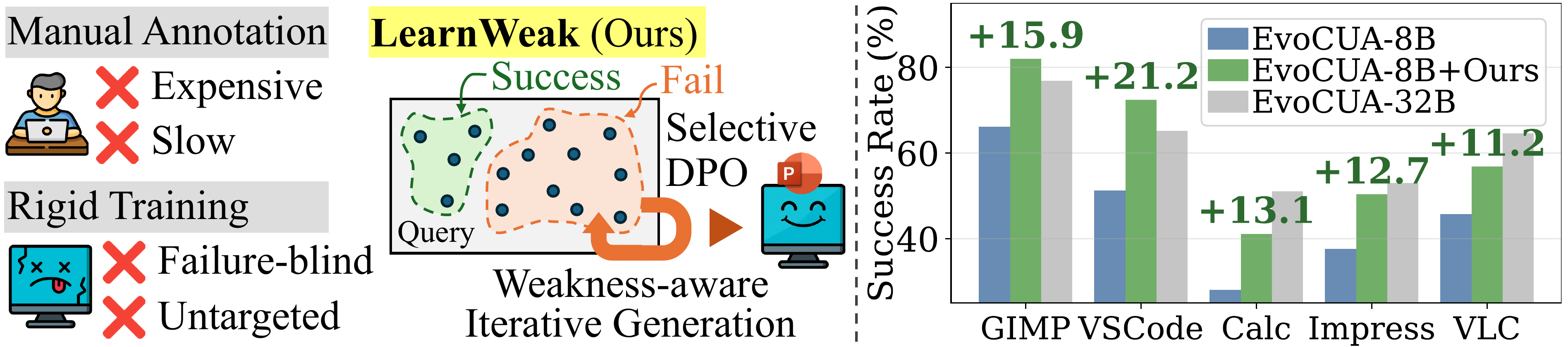
Left: Conceptual illustration of LearnWeak: unlike existing approaches that aim for broad domain coverage, LearnWeak targets the specific weaknesses of the current student. Right: Representative performance gains across target software domains after domain specialization with LearnWeak.

Abstract

Computer-use agents (CUAs) have recently made substantial progress, but deploying a separate large expert for each software domain remains expensive. Small open CUAs are more practical specialization targets, but they remain substantially weaker and exhibit uneven domain-specific failures. A straightforward remedy is to synthesize large-scale training data for the target domain, yet we find that this naive approach yields only marginal improvements. Building on this observation, we introduce LearnWeak, an annotation-free specialization framework for small CUAs that uses a stronger reference agent to identify the student's weaknesses in the target domain, synthesize targeted tasks, and construct supervision automatically. LearnWeak further introduces an error-aware specialization objective that disentangles planning and execution errors, enabling more behaviorally precise updates than broad uniform supervision. On OSWorld, LearnWeak achieves average gains of 11.6 and 11.1 percentage points over EvoCUA-8B and OpenCUA-7B, respectively, across eight domains. We also validate that our student-aware dataset generation and training approaches outperform existing autonomous trajectory generation and training baselines. Our work highlights the importance of student-awareness in both data synthesis and agent training, pointing toward a more principled and efficient path for specializing small CUAs in diverse domains.

Method

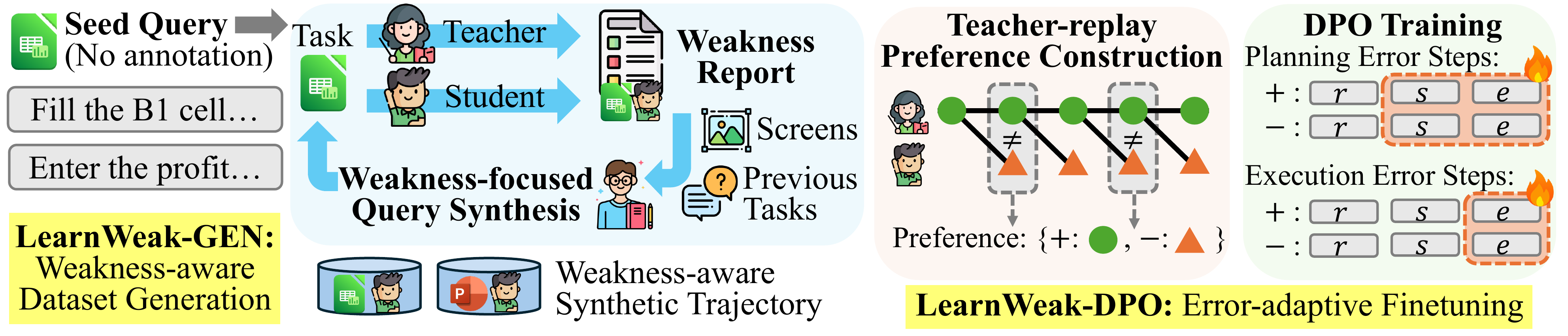
LearnWeak decomposes domain specialization into two coupled stages: LearnWeak-Gen, an annotation-free data generation loop driven by student failures, and LearnWeak-DPO, an error-aware preference optimization that adaptively targets each failure type.

LearnWeak Method Overview
Overview of the LearnWeak framework. LearnWeak-Gen iteratively constructs domain data by comparing teacher and student rollouts, summarizing student weaknesses, and generating new tasks conditioned on weakness reports and representative screenshots. LearnWeak-DPO then converts the resulting teacher-success/student-failure cases into step-wise preference supervision and specializes the student with error-aware preference optimization.
Stage 1

LearnWeak-Gen: Weakness-Aware Data Generation

1

Seed Query Setup

A small set of seed tasks per domain is initialized with no trajectory annotation required.

2

Weakness Discovery

Teacher and student are run on the same tasks. Cases where the teacher succeeds but the student fails are collected, and a verifier summarizes recurring failure modes into a weakness report.

3

Screenshot-Guided Query Generation

New tasks are synthesized via two strategies: weakness-focused (conditioned on the weakness report) and exploration-focused (conditioned on screenshots), balancing targeted repair with domain coverage.

4

Iterative Refinement

Steps 2 and 3 repeat for multiple iterations, progressively focusing the task distribution on unresolved student weaknesses.

Stage 2

LearnWeak-DPO: Error-Aware Preference Optimization

1

Teacher-Replay Preference Construction

The teacher trajectory is replayed step by step. At each step, the student is queried under the teacher's context, and steps with differing tool executions form preference pairs.

2

Error-Type Classification

Each pair is labeled as a planning error (different action type) or an execution error (same action type, different parameters).

3

Selective Supervision Masking

A token-level mask restricts gradient updates to the relevant failure site. Reasoning traces are excluded; action descriptions are supervised only for planning errors; tool executions are always supervised.

4

Domain-Scalable LoRA Deployment

Domain knowledge is stored in lightweight LoRA adapters $\{\Delta_d\}$. The base student is shared across domains, and the matching adapter is activated at inference time.

Experiments

Domain Specialization Results on OSWorld

LearnWeak yields consistent improvements across all eight domains for both student models.

Model Gimp Calc Impress Writer OS Thunderbird VLC VSCode Avg.
Generalized Models
Kimi K2.6 73.0880.8582.1973.91 79.1780.0075.7191.30 79.53
Claude Sonnet 4.6 69.2374.4770.2186.83 91.6766.6781.4172.73 76.65
Qwen3.5-27B 39.7422.7043.9752.17 41.6766.6744.1247.83 44.86
Domain Specialized CUA Models
SEAgent 42.3022.7031.80 35.3040.50
OSExpert 30.8044.7042.6034.70
CUA Models
EvoCUA-32B Teacher 76.2951.0652.9865.22 75.0060.0064.6565.22 63.80
OpenCUA-32B 74.3635.4648.2156.52 61.1157.7837.2572.73 55.43
EvoCUA-8B 66.1528.0737.6650.43 60.8365.3345.7151.30 50.69
EvoCUA-8B + LearnWeak 82.0541.1350.3555.07 66.6773.3356.8672.46 62.24
Δ +15.9+13.1+12.7+4.6 +5.8+8.0+11.2+21.2 +11.6
OpenCUA-7B 48.4611.9131.4930.43 40.0054.6732.9451.30 37.65
OpenCUA-7B + LearnWeak 57.6919.1536.8840.58 59.4266.6747.0662.32 48.72
Δ +9.2+7.2+5.4+10.2 +19.4+12.0+14.1+11.0 +11.1
+11.6 pp
avg. improvement
EvoCUA-8B
+11.1 pp
avg. improvement
OpenCUA-7B
3 / 8
domains where EvoCUA-8B
surpasses the 32B teacher

Finding 1: Small students can surpass the teacher

The specialized EvoCUA-8B outperforms the 32B teacher on Gimp, Thunderbird, and VSCode, showing that targeted corrective supervision can go beyond imitation.

Finding 2: Gains are student-dependent, not domain-dependent

EvoCUA-8B improves most on VSCode, Gimp, Calc, and Impress, while OpenCUA-7B gains most on OS, VLC, Thunderbird, and VSCode. This suggests specialization depends more on how each student adapts to a domain's interaction patterns than on domain difficulty alone.

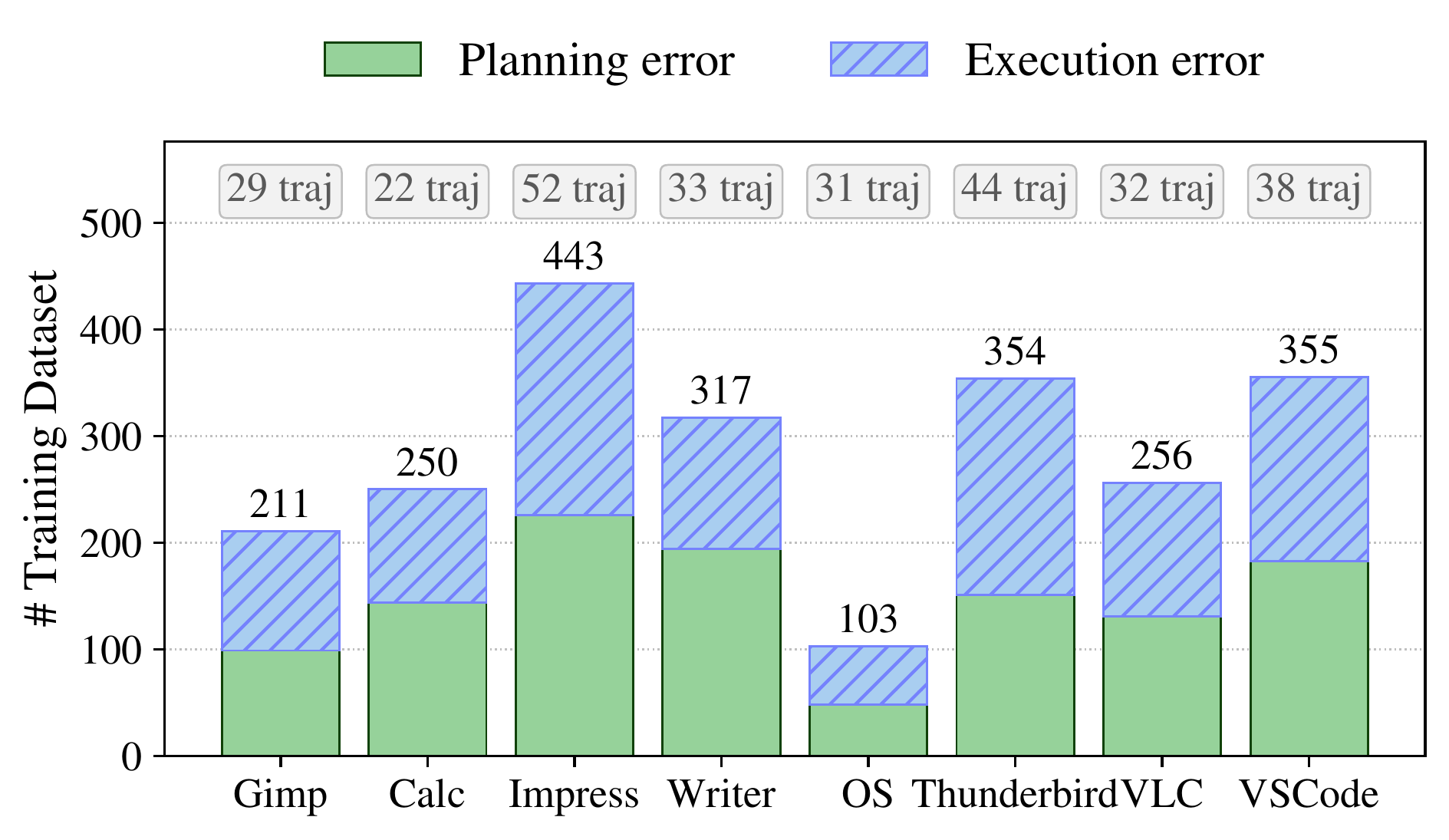
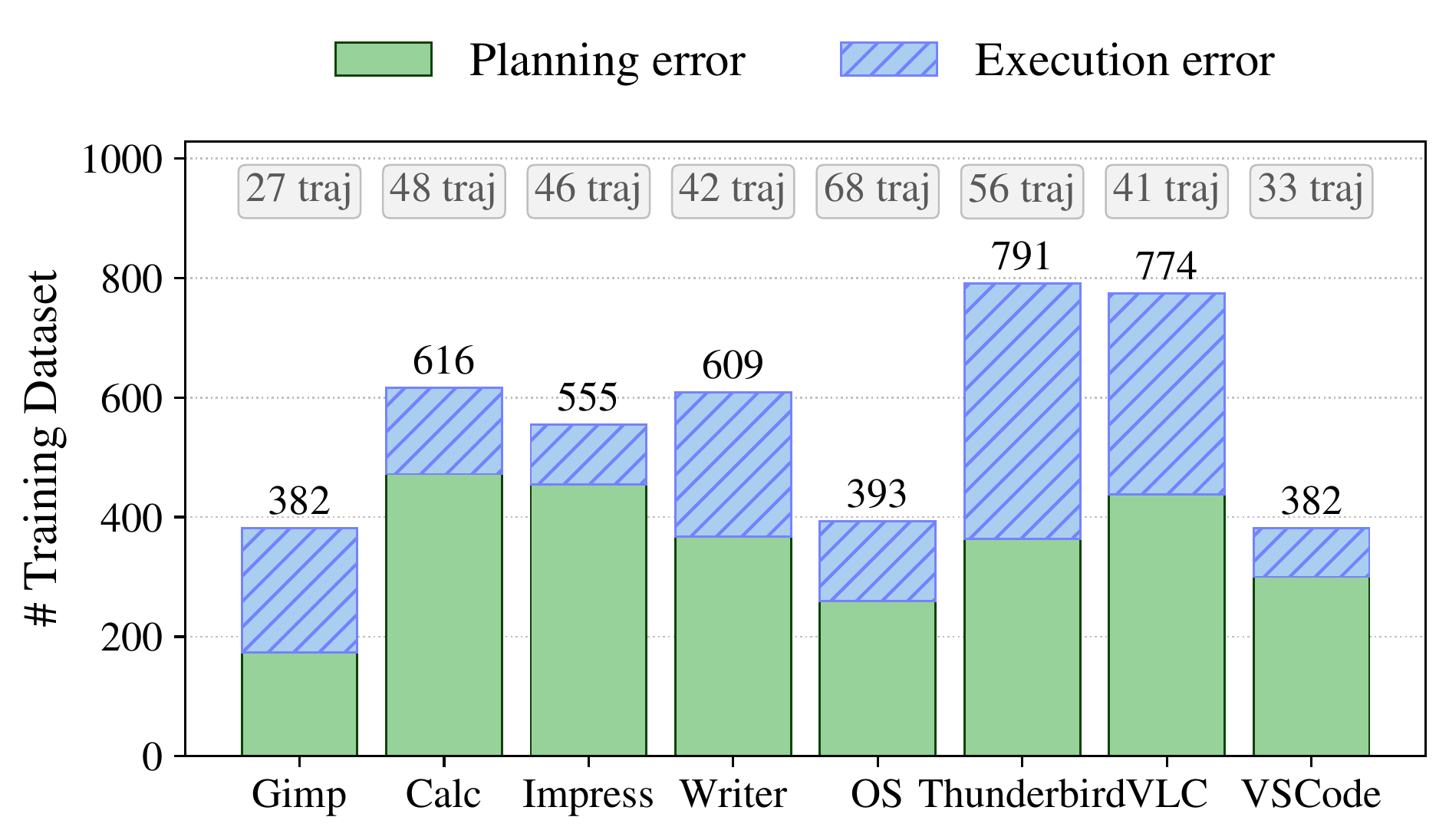
Data Generation Statistics

Domain-level statistics of the generated datasets, including teacher-pass/student-fail trajectory counts and the breakdown of planning and execution errors. The heterogeneous error distribution across domains confirms that different software environments expose different student failure modes.

Data statistics for EvoCUA-8B
Generated data statistics: EvoCUA-8B student with EvoCUA-32B teacher.
Data statistics for OpenCUA-7B
Generated data statistics: OpenCUA-7B student with EvoCUA-32B teacher.

Data Construction Comparison

We compare LearnWeak-Gen against existing datasets and alternative data construction pipelines under a matched training budget (EvoCUA-8B student).

Method Calc Impress VLC VSCode Avg.
Zero-shot 28.0737.6645.7151.30 40.69
Existing Data
AgentNet 34.0439.0149.0169.57 47.91
AgentNet (N.) 32.6240.4349.0263.77 46.46
Minimal Human Annotation
Trajectory Boosting 30.5019.8845.1049.28 36.19
Zero Human Annotation
AgentSynth 31.2139.0139.2271.01 45.11
OS-Genesis 31.9137.5945.1068.12 45.68
ZeroGUI 36.1740.4348.8662.30 46.94
WebSTAR 31.2140.4352.9473.91 49.62
LearnWeak (Ours) 41.1350.3556.8672.46 55.20

LearnWeak outperforms all baselines on average, achieving a 5.58 pp gain over WebSTAR. Note that WebSTAR is a step-level filtering method applied to the same weakness-aware generated data, so the two methods differ only in the filtering stage. Reusing existing data (AgentNet) or generating without weakness targeting (AgentSynth, OS-Genesis, ZeroGUI) provides limited gains.

Analysis

Data Generation Pipeline Ablation

We ablate the key design choices of LearnWeak-Gen: iterative generation and weakness-report conditioning.

Domain
Specialization
Iterative
Generation
Weakness
Report
Calc Impress VLC VSCode Avg.
28.0737.6645.7151.30 40.69
34.5739.7247.0673.91 48.82
24.8242.5543.1472.46 45.74
41.1350.3556.8672.46 55.20
One-shot (no iteration, no weakness report) Iterative, no weakness report Full pipeline (LearnWeak)

Key Insight: Iteration alone is insufficient; weakness-aware guidance is essential

One-shot domain specialization (no iteration) already provides a useful baseline (40.69 → 48.82 avg.). However, adding iteration without the weakness report actually hurts performance (45.74 avg.), showing that exploration-only generation fails to collect effectively targeted training samples. The full pipeline combining iteration with weakness-report conditioning achieves the best result (55.20 avg.), demonstrating that the benefit of iterative expansion depends on student-aware guidance.

Effect of Teacher Choice

Teacher Policy Teacher Specialized Student
CalcVSCode CalcVSCode
Zero-shot 28.0751.30
Claude Haiku 4.6 36.1769.60 30.5071.01
EvoCUA-32B 51.0665.22 41.1372.46
Kimi K2.5 63.8386.96 41.1373.91

Teacher strength matters up to a point: the weaker Claude Haiku 4.6 yields smaller student gains than EvoCUA-32B or Kimi K2.5. Yet despite a large gap in their own success rates, EvoCUA-32B and Kimi K2.5 produce nearly identical specialized student performance. Once the teacher is strong enough to generate reliable trajectories, further gains depend on whether its supervision targets actionable weaknesses for the student, not on raw teacher performance.

Student-Awareness of Dataset Generation

We train each target model on datasets constructed from weakness reports derived from different source students. Because failure cases and weakness types differ across student models, a student-aware generator produces the most useful data when the weakness report is derived from the target model itself.

Target Model $\pi_\theta$ / Source Student $\pi_S$ Calc Impress VLC VSCode
OpenCUA-7B (target)
Zero-shot 11.9131.4932.9451.30
Source: EvoCUA-8B 9.9327.5445.1050.72
Source: UI-TARS-1.5-7B 7.8033.3549.28
Source: OpenCUA-7B (own) 19.1536.8847.0662.32
EvoCUA-8B (target)
Zero-shot 28.0737.6645.7151.30
Source: UI-TARS-1.5-7B 22.7031.2171.01
Source: OpenCUA-7B 39.0143.2647.0673.91
Source: EvoCUA-8B (own) 41.1350.3556.8672.46

Both models achieve the highest performance when trained on datasets generated from their own failure cases, while cross-student datasets yield consistently lower gains. This confirms that LearnWeak-Gen captures model-specific deficiencies rather than generic task distributions.

Training Objective Ablation

We compare LearnWeak-DPO with standard SFT, DPO, and variants with different error-aware supervision masks, all trained on the same dataset from LearnWeak-Gen.

Method Calc Impress VLC VSCode Avg.
Zero-shot 28.0737.6645.7151.30 40.69
SFT
Standard SFT ($m = \varnothing$) 29.0839.7245.1068.12 45.51
LearnWeak-SFT 34.0446.8145.1069.57 48.88
DPO
Standard DPO ($m = \varnothing$) 27.6640.4349.0265.22 45.58
DPO, planning-only mask 18.4417.0241.1863.77 35.10
DPO, execution-only mask 24.8239.7245.1071.01 45.16
LearnWeak-DPO (Ours) 41.1350.3556.8672.46 55.20

Full-response optimization (standard SFT/DPO) improves only modestly. Error-aware masking consistently improves SFT, and LearnWeak-DPO outperforms standard DPO by 9.62 points on average. Using only planning-level or only execution-level supervision is insufficient; effective specialization requires both.
Qualitative Results

The following case studies compare OSWorld benchmark trajectories before and after specialization in LibreOffice Calc and LibreOffice Impress. Each study shows how specialization changes the agent's local decision-making behavior, not merely the final task outcome.
🔍 Click any screenshot to enlarge.

Case Study #1: LibreOffice Calc
"Sort the records according to the amounts ascendingly."
Before Specialization
Before step 4
Step 4
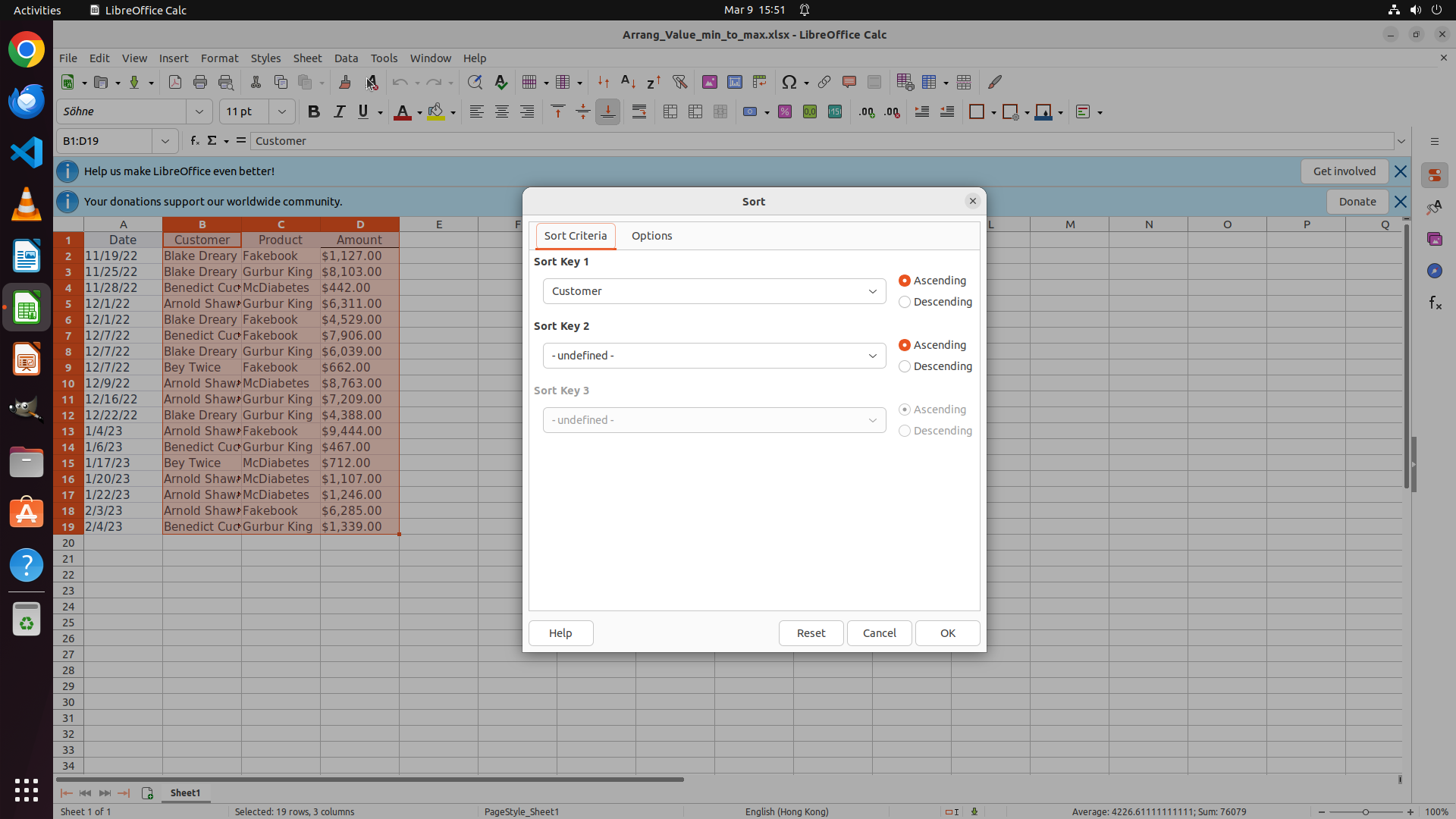
Selected columns B–D only, starting from Customer column.
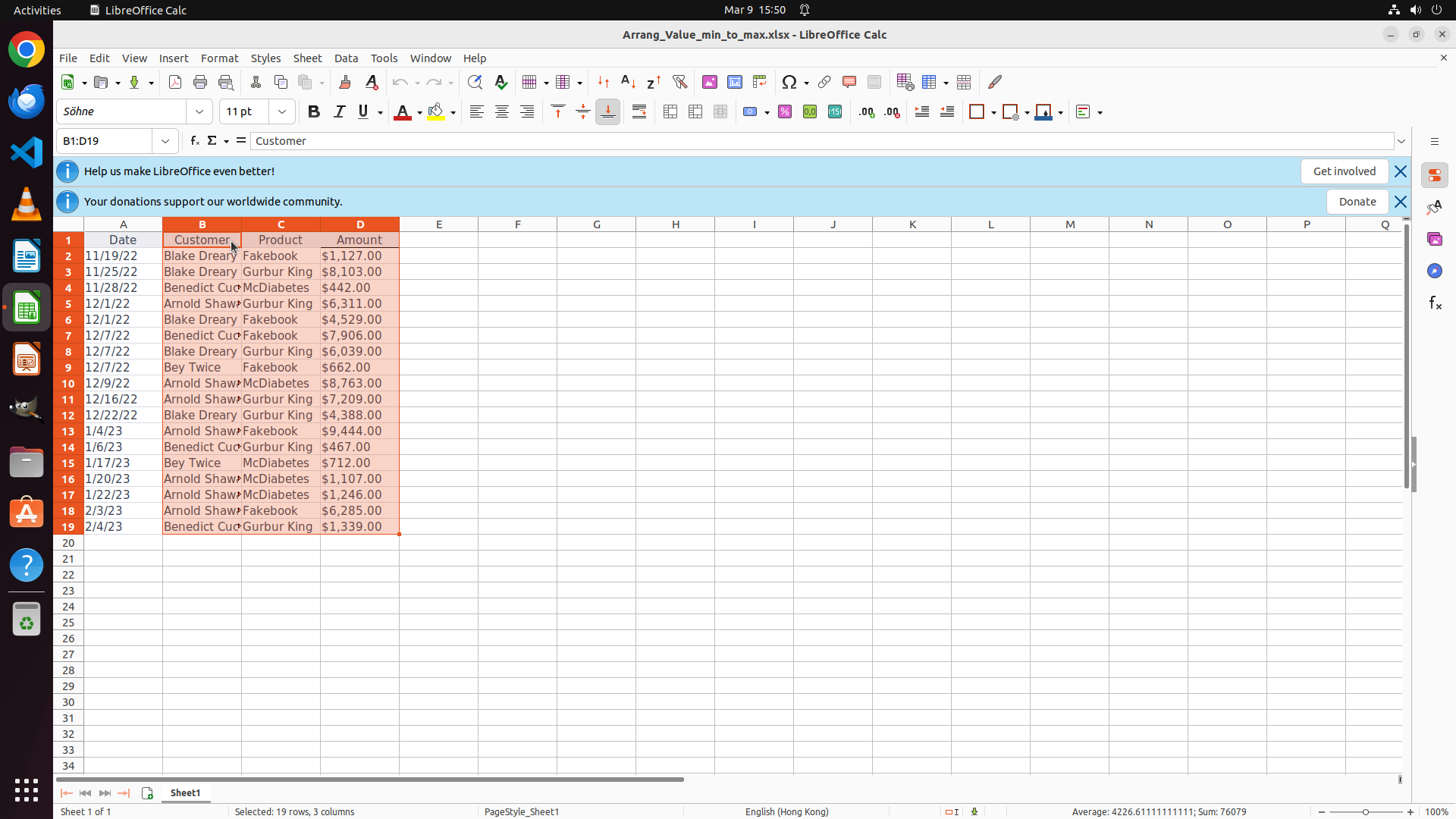
Before step 5
Step 5
Range B1:D19 selected (3 of 4 columns, missing column A).
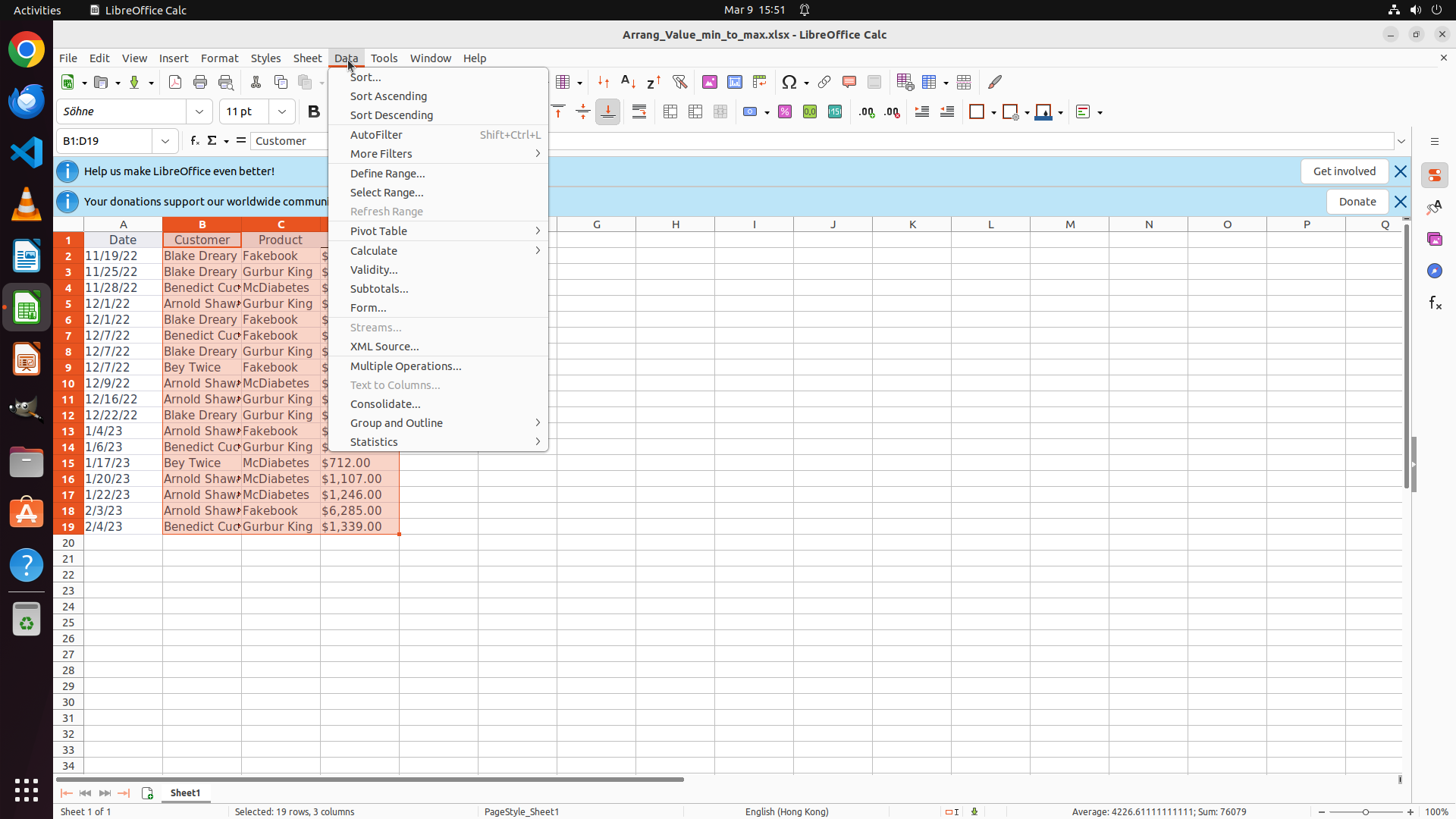
Before step 6
Step 6
Opened Data menu to proceed with partial-range sort.

The baseline selects only columns B–D, so the sort operates on a partial table rather than the full sheet range, misaligning rows.

After Specialization
After step 4
Step 4
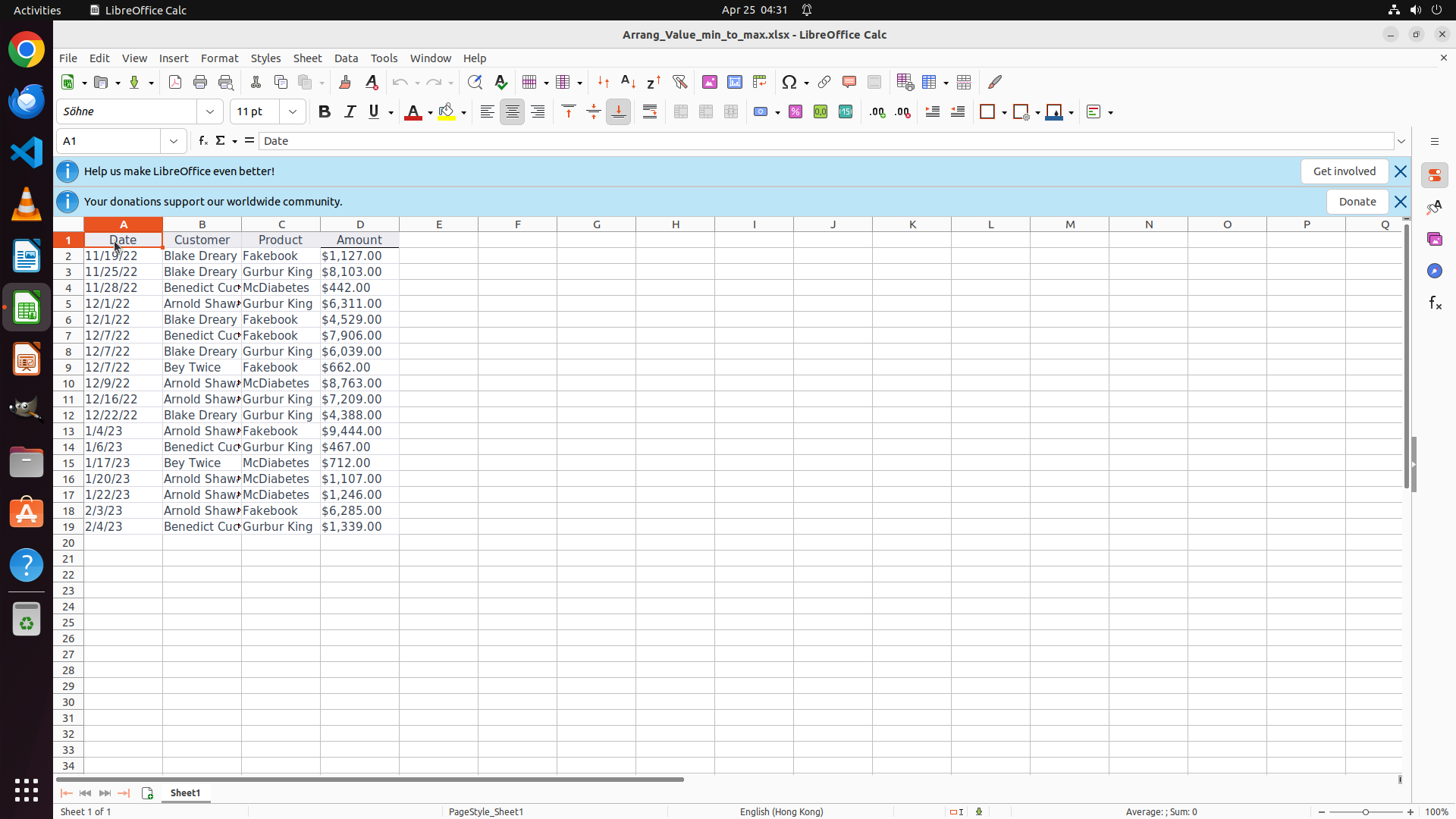
Selected entire data range from A1 including all four columns.
After step 5
Step 5
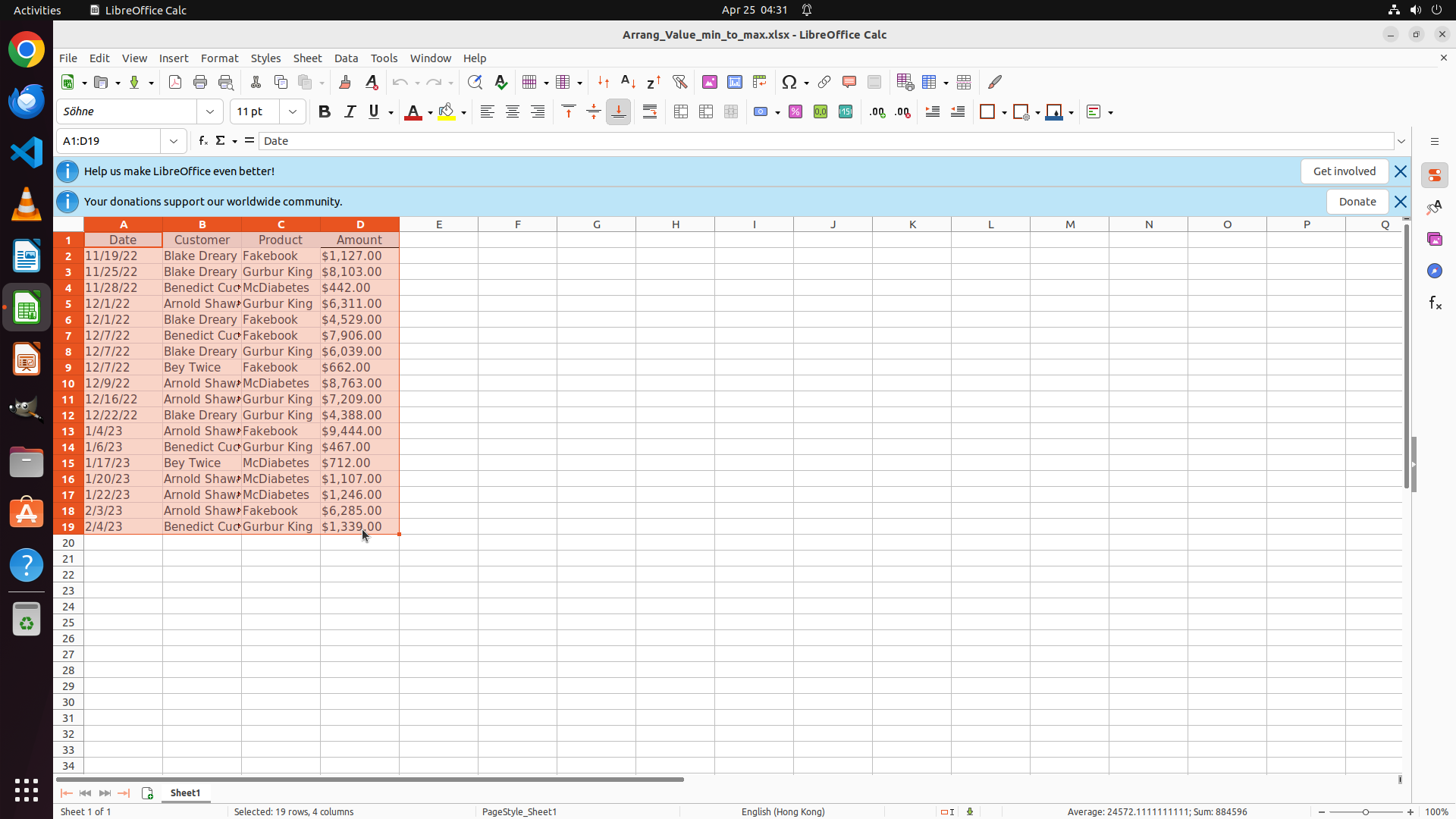
Range A1:D19 selected (all 19 rows, all 4 columns).
After step 6
Step 6
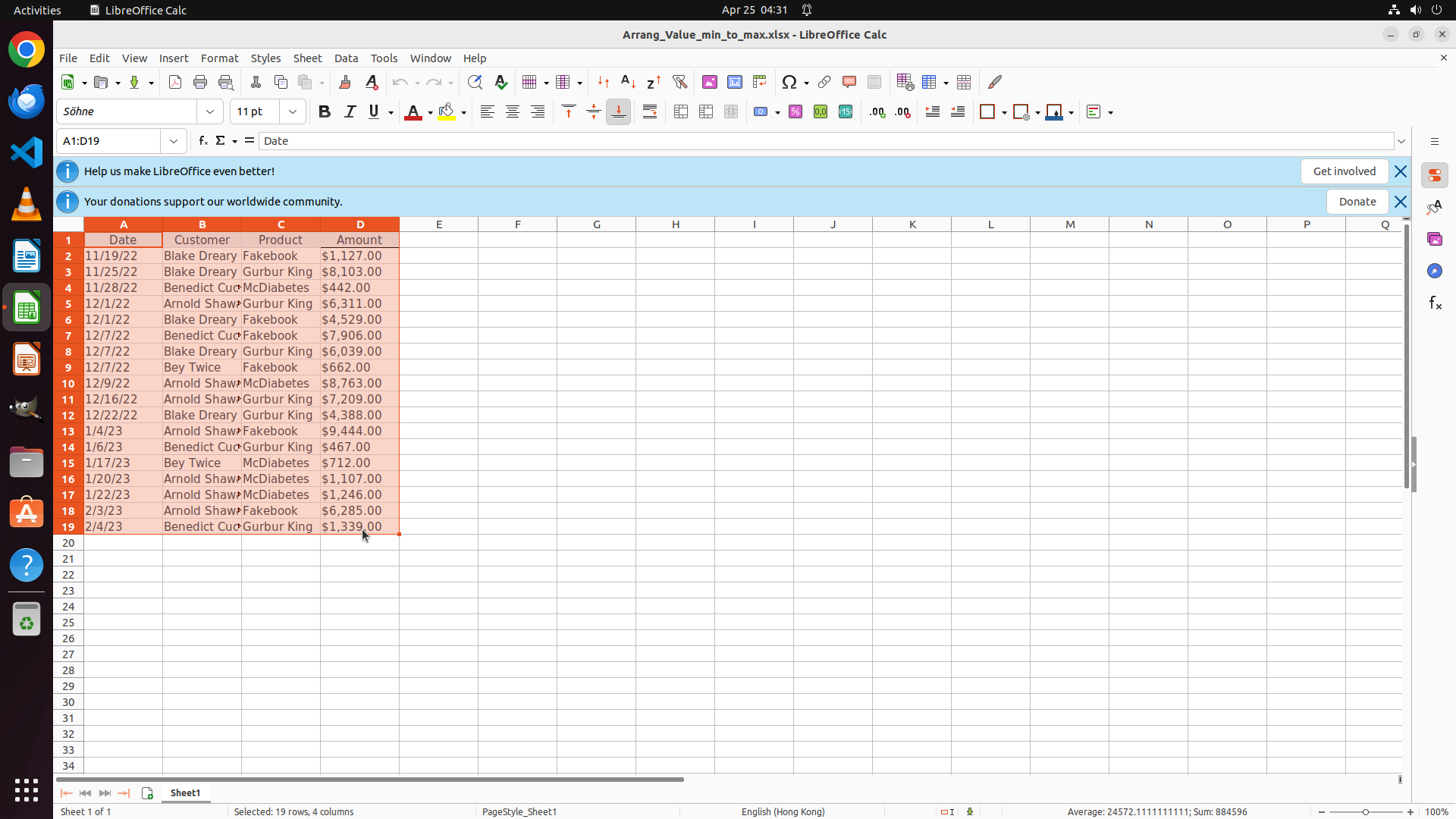
Opened Data menu with the correct full-table selection active.

The specialized model explicitly expands the selection to A1:D19 before sorting, preserving row integrity across all columns.

Analysis: The decisive difference is the selected range. The failing baseline sorts only B1:D19, violating the full-table requirement. The specialized model selects A1:D19, matching the weakness category identified during data generation (incorrect range selection before table operations).
Case Study #2: LibreOffice Calc
"Fill the Gross profit column, then create Year_Profit column in Sheet2 combining year and integer gross profit."
Before Specialization
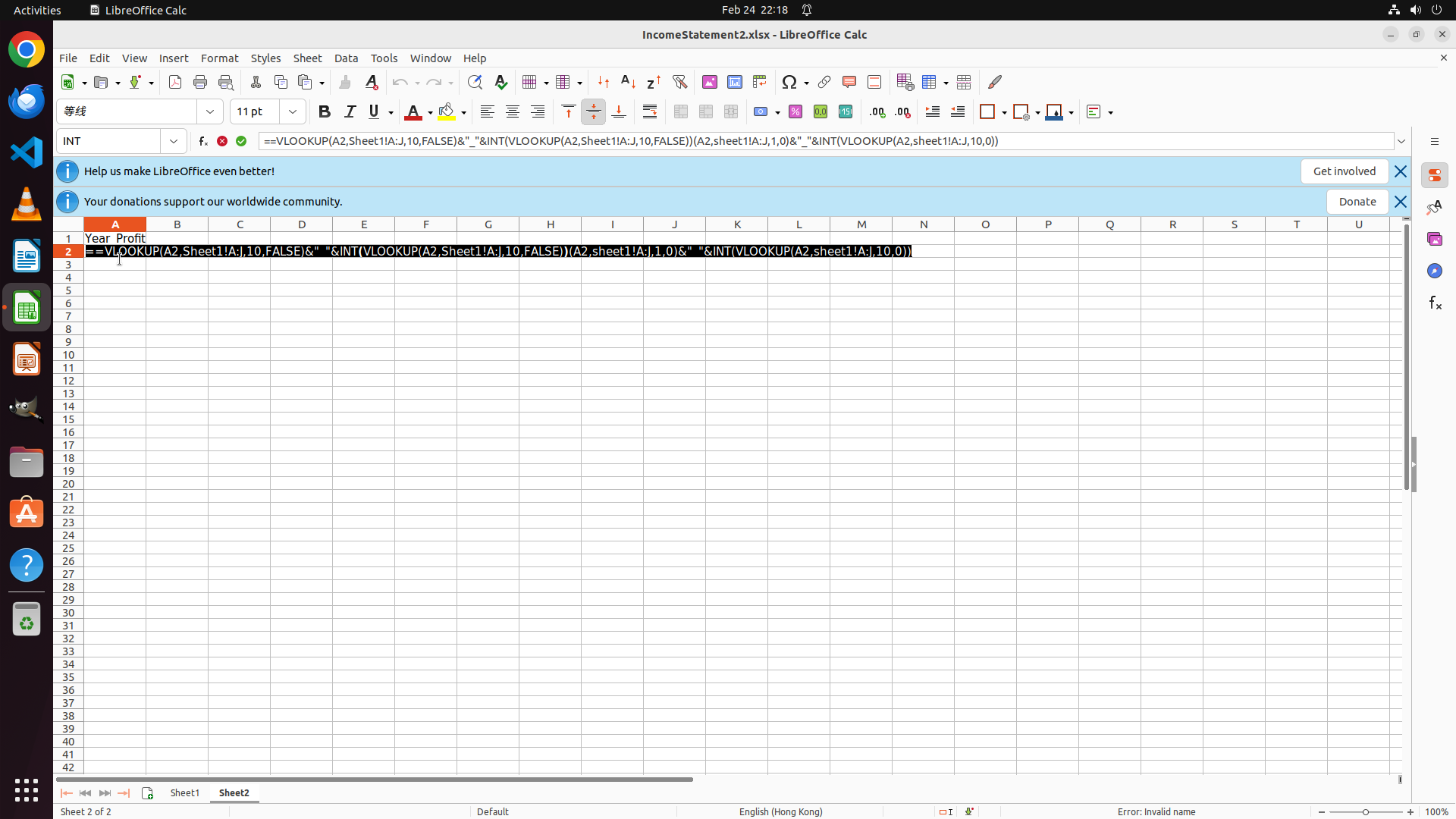
Before step 47
Step 47
Prepared to replace formula bar with a VLOOKUP-based construction.
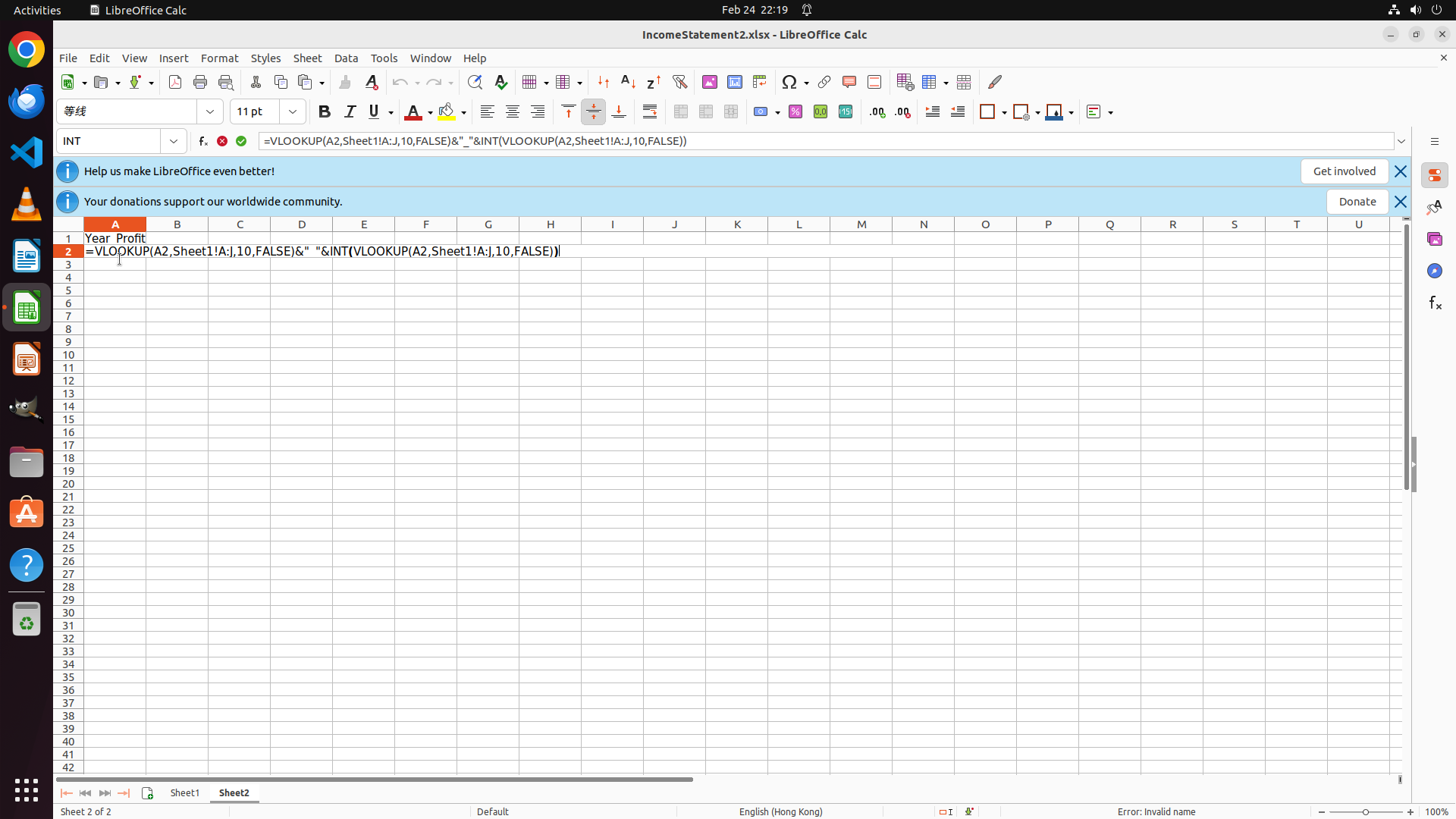
Before step 48
Step 48
Typed a complex nested VLOOKUP concatenation formula.
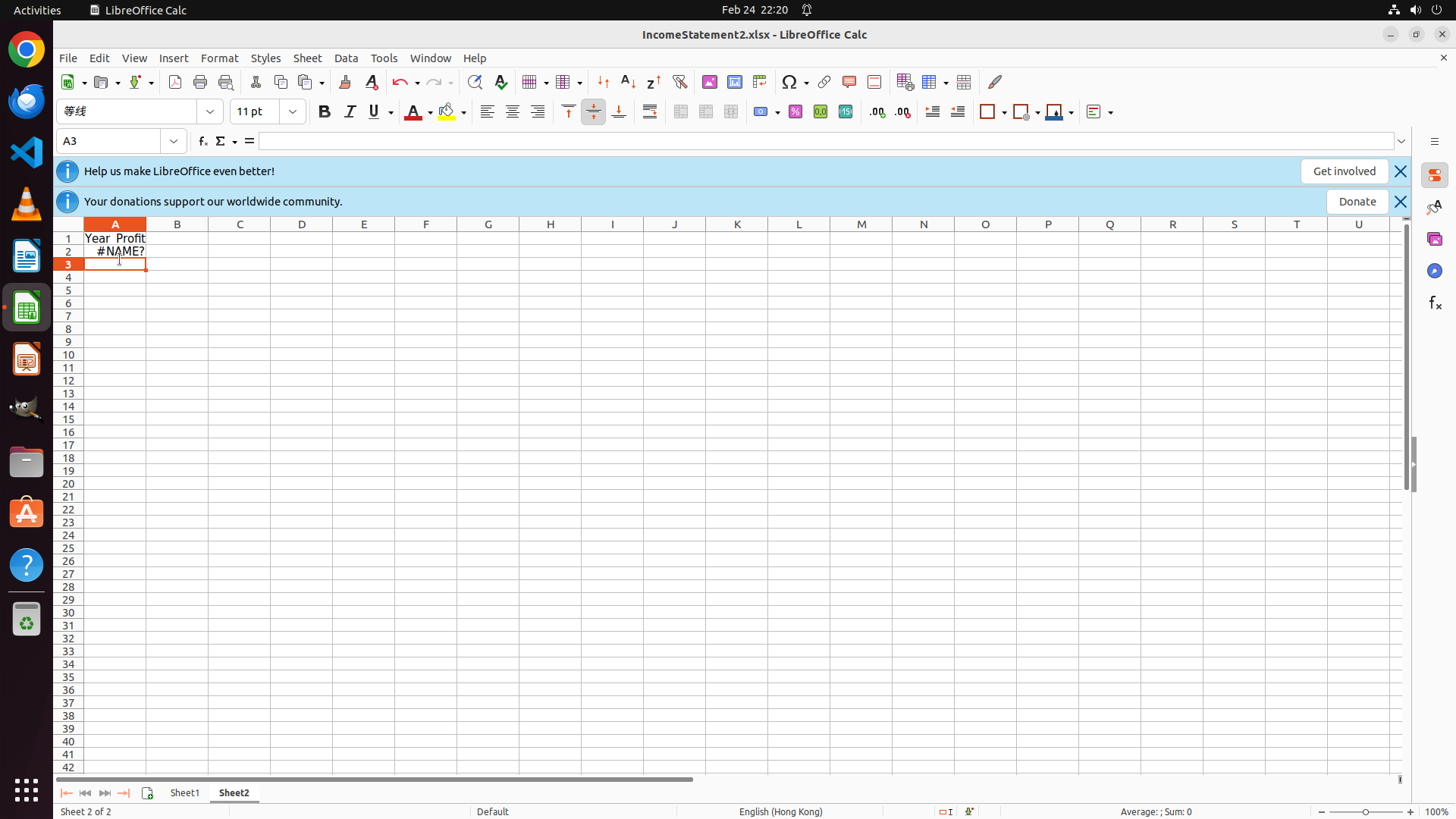
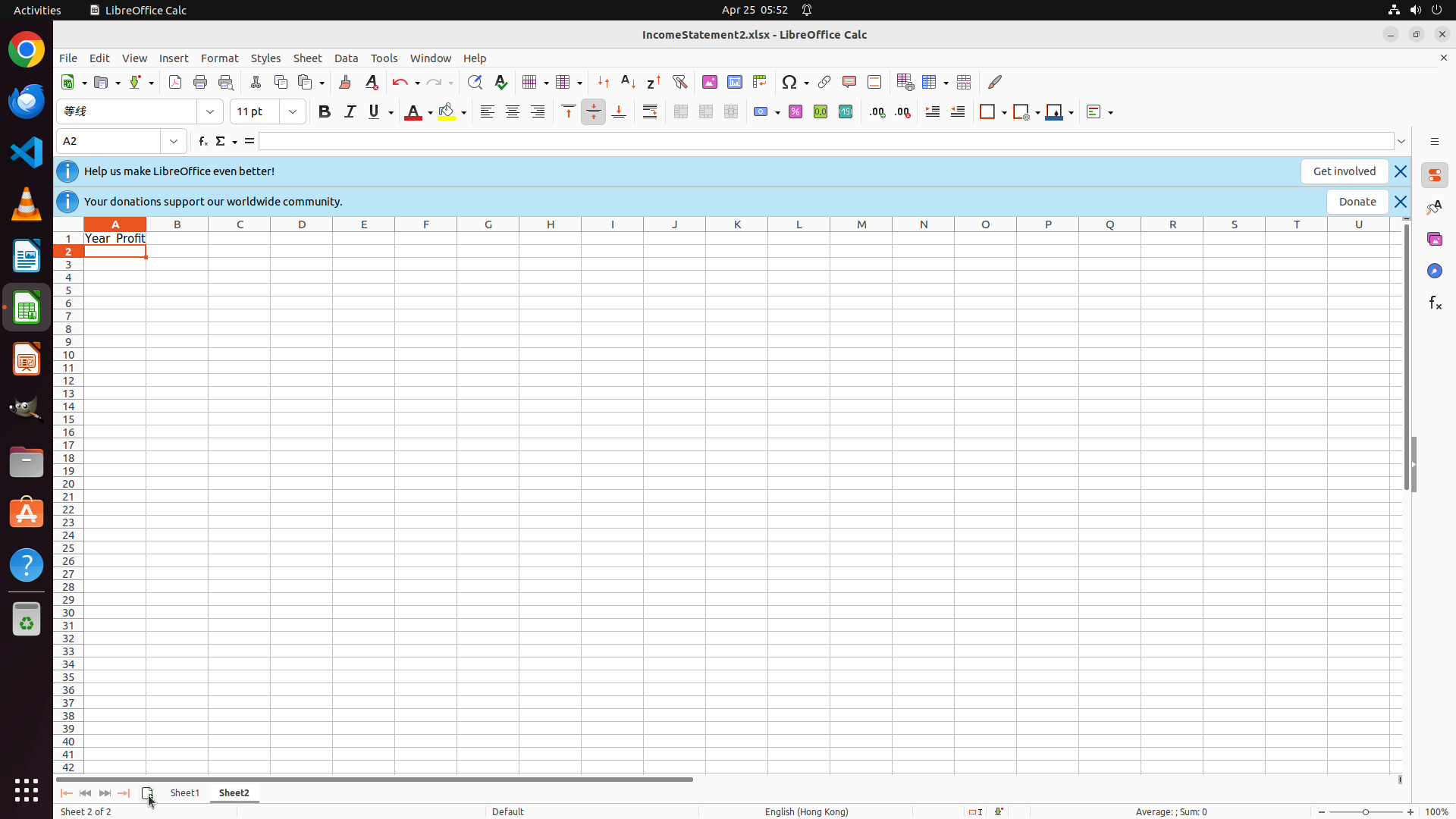
Before step 49
Step 49
Formula resulted in a #NAME? error in Sheet2!A2.

The baseline commits to an unnecessarily complex VLOOKUP-based construction and ends with a #NAME? error instead of a usable row-wise formula.

After Specialization
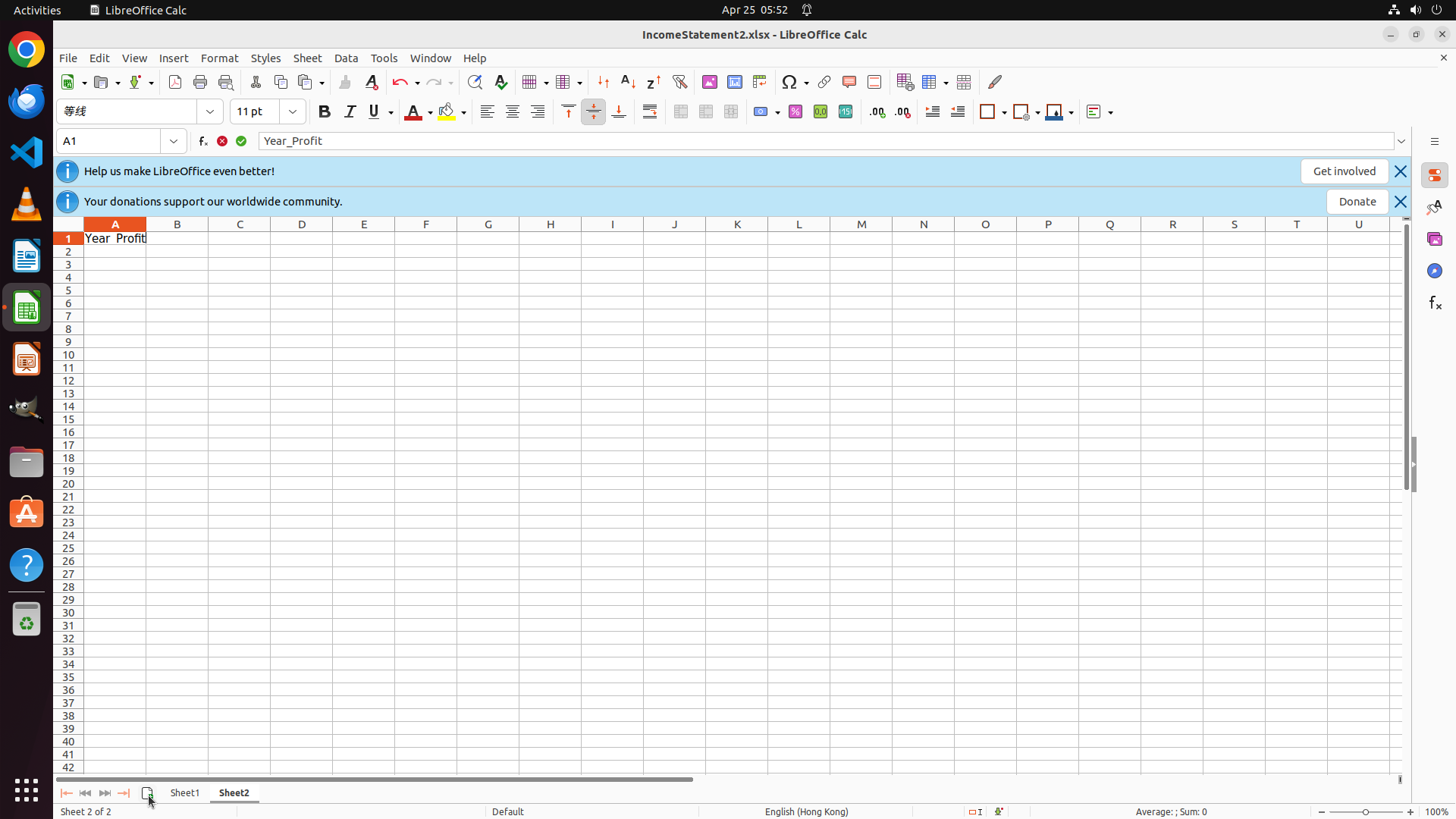
After step 13
Step 13
Entered header "Year_Profit" in Sheet2!A1 correctly.
After step 14
Step 14
Confirmed header and moved to next row for formula entry.
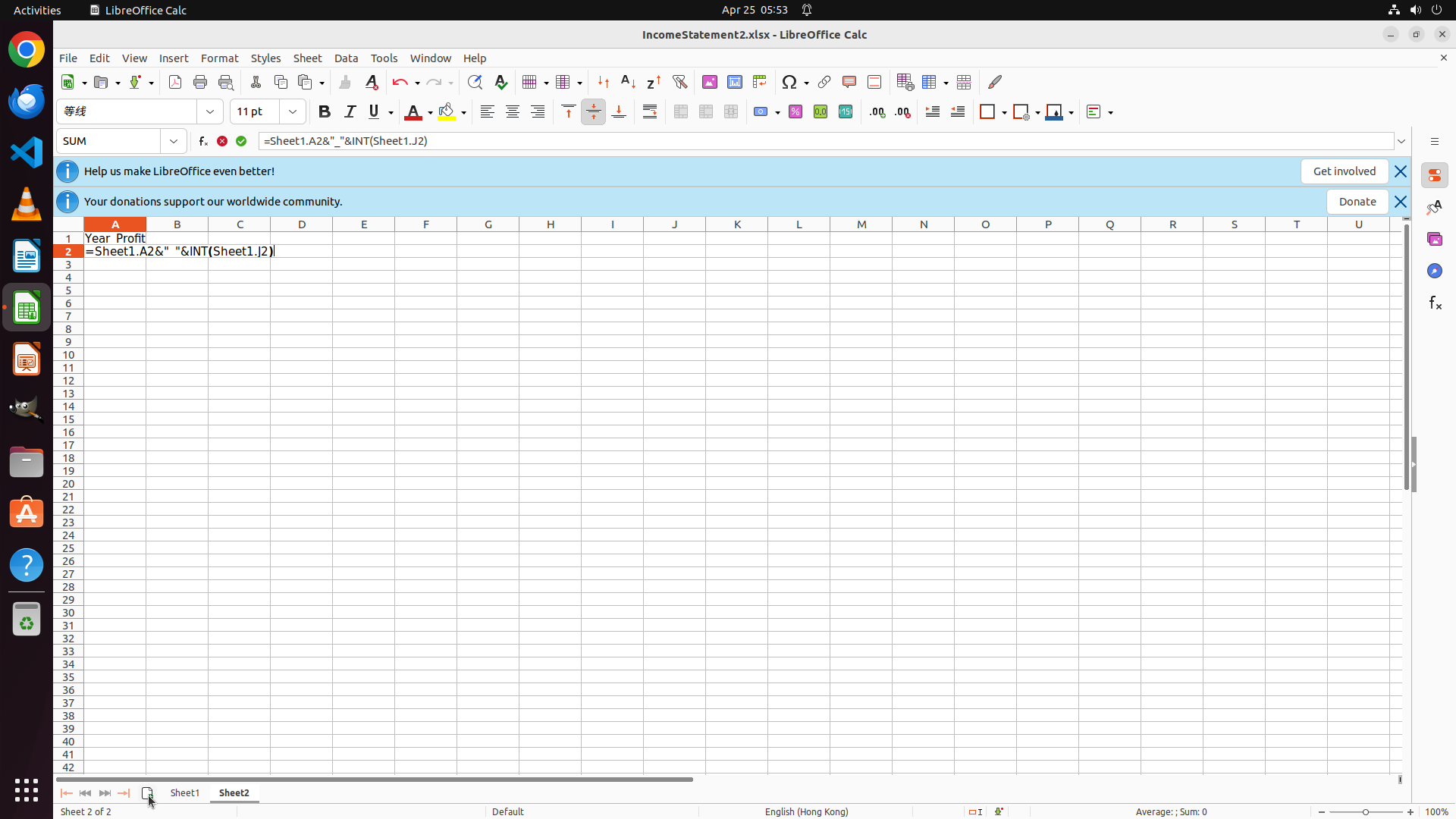
After step 15
Step 15
Entered direct row-wise formula =Sheet1.A2&"_"&INT(Sheet1.J2), producing a valid result.

The specialized model uses a simple direct row-wise reference that immediately yields a valid Year_Profit value, replacing brittle lookup logic with the simplest pattern compatible with the task.

Analysis: The baseline chooses an unnecessarily complex VLOOKUP formula that repeatedly fails with a #NAME? error. The specialized model instead uses =Sheet1.A2&"_"&INT(Sheet1.J2), the simplest formula consistent with the task, and propagates it down the column.
Case Study #3: LibreOffice Impress
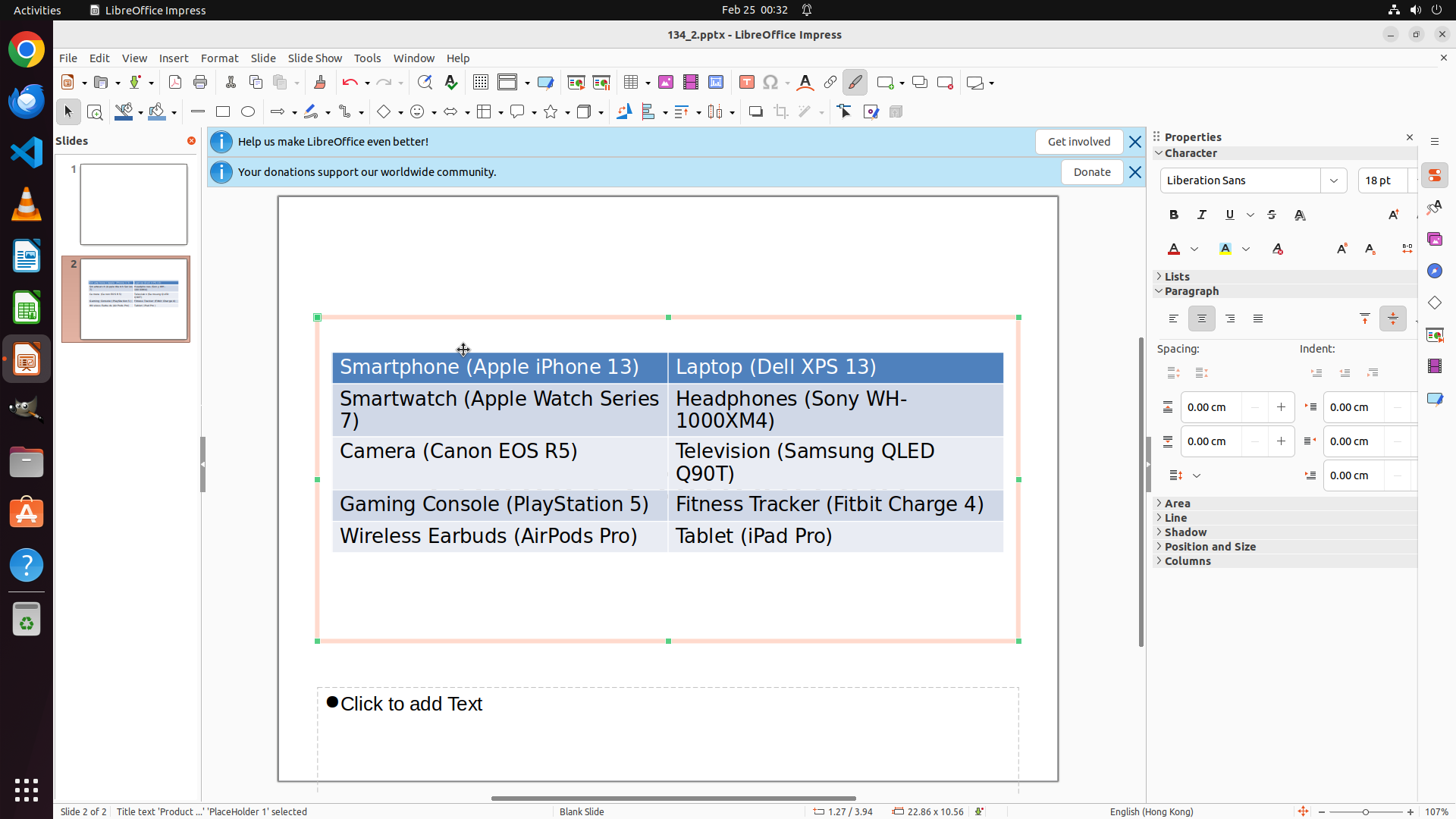
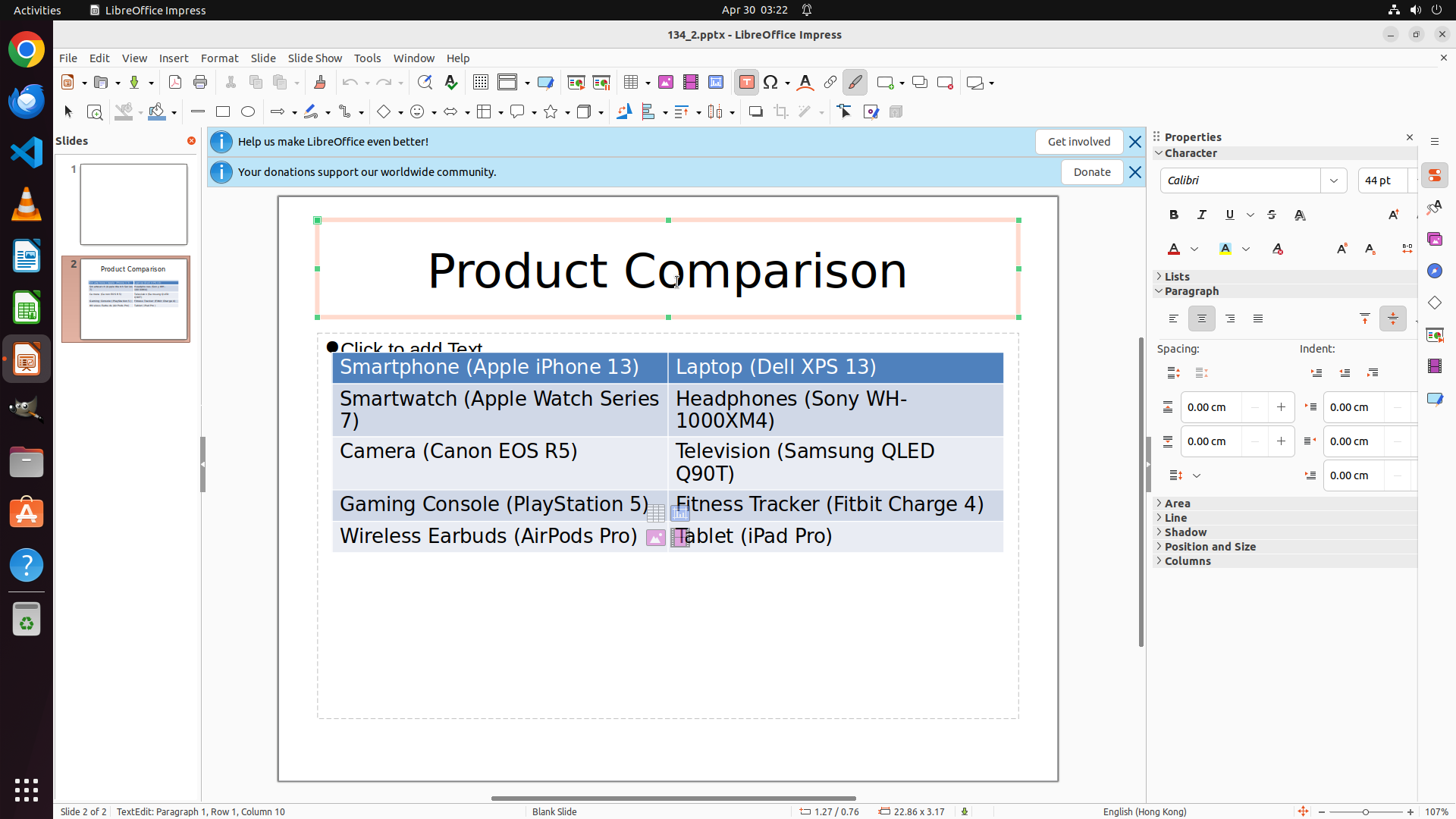
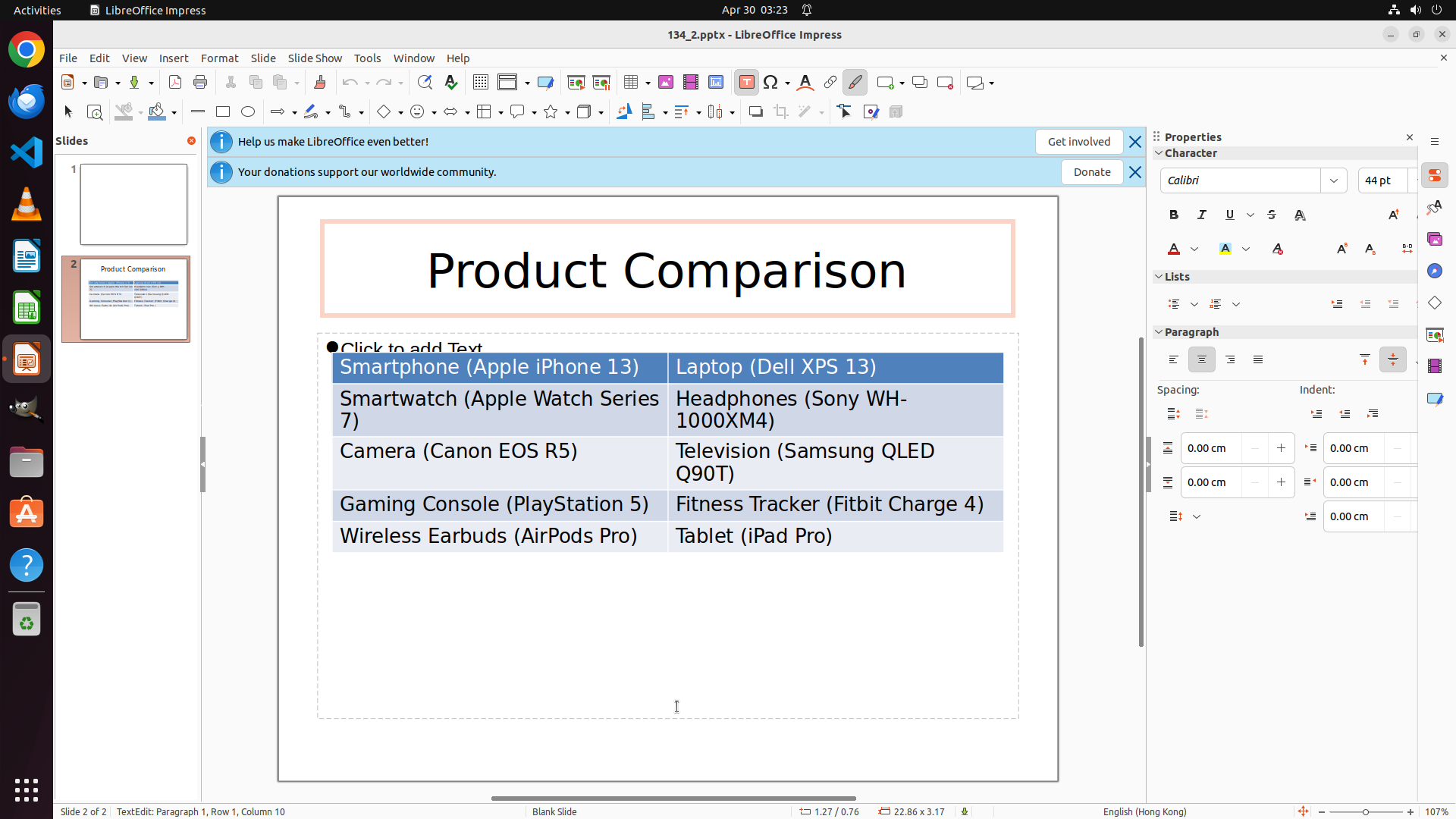
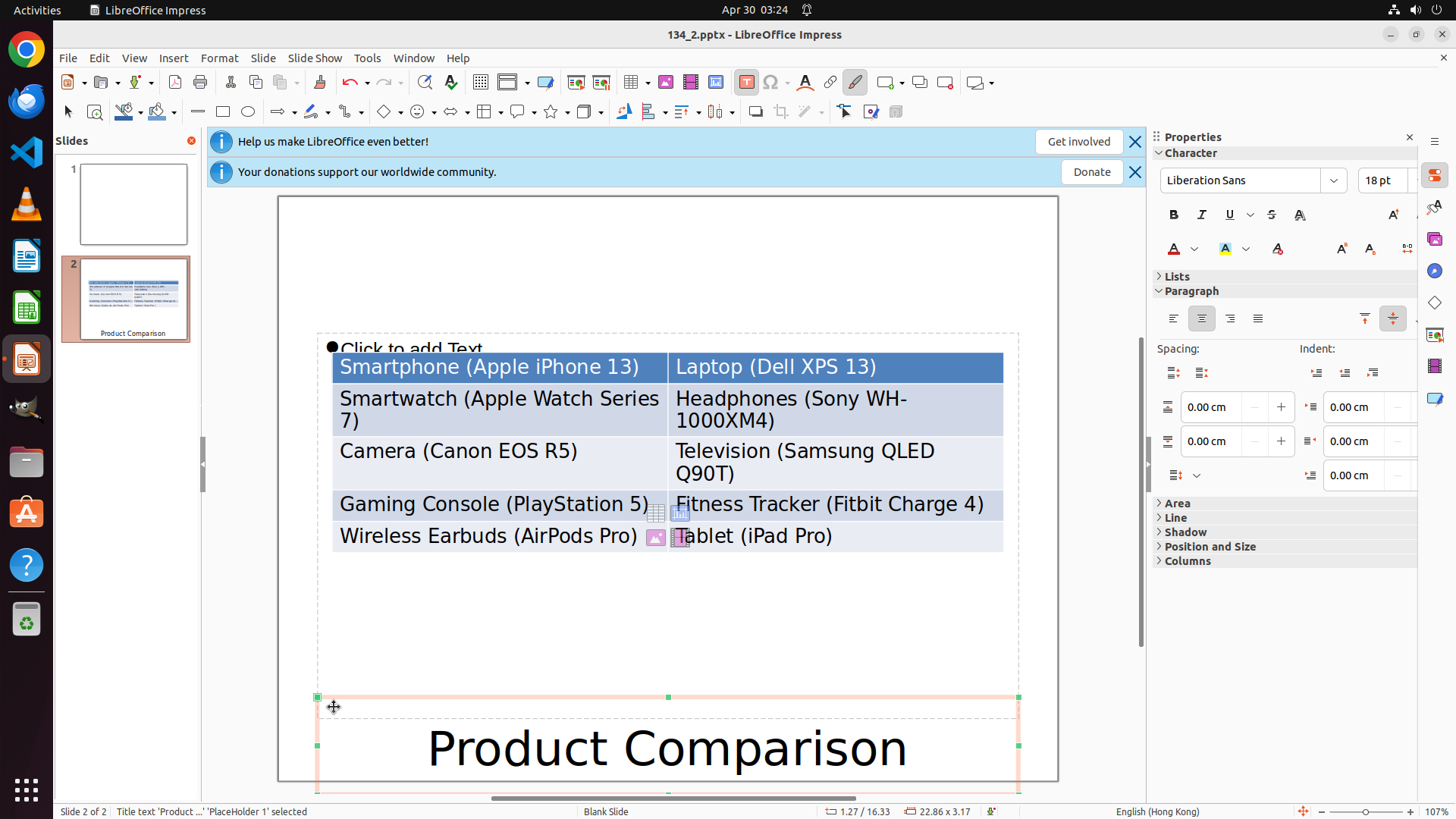
"Move the title of page 2 to the bottom of the slide."
Before Specialization
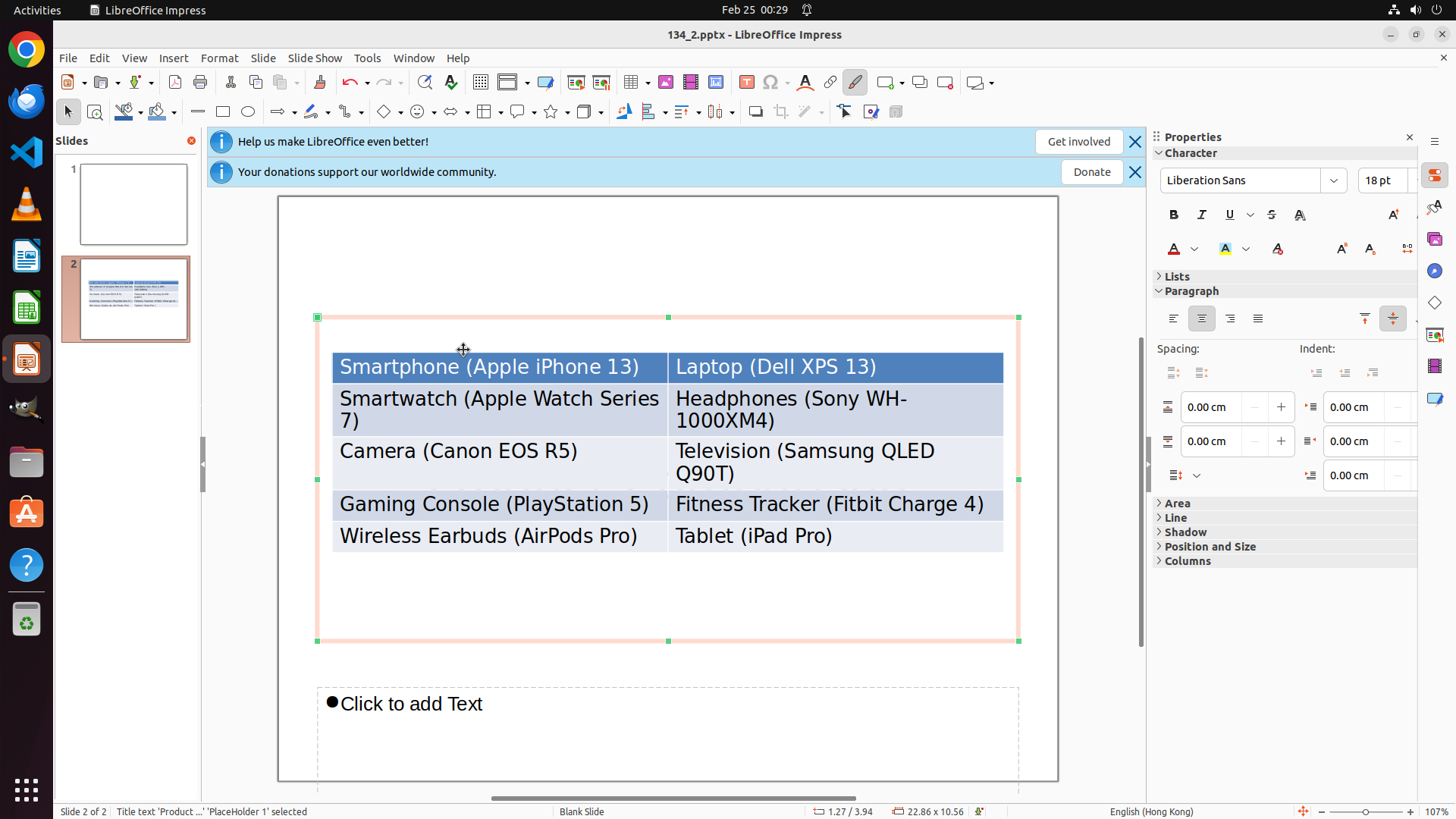
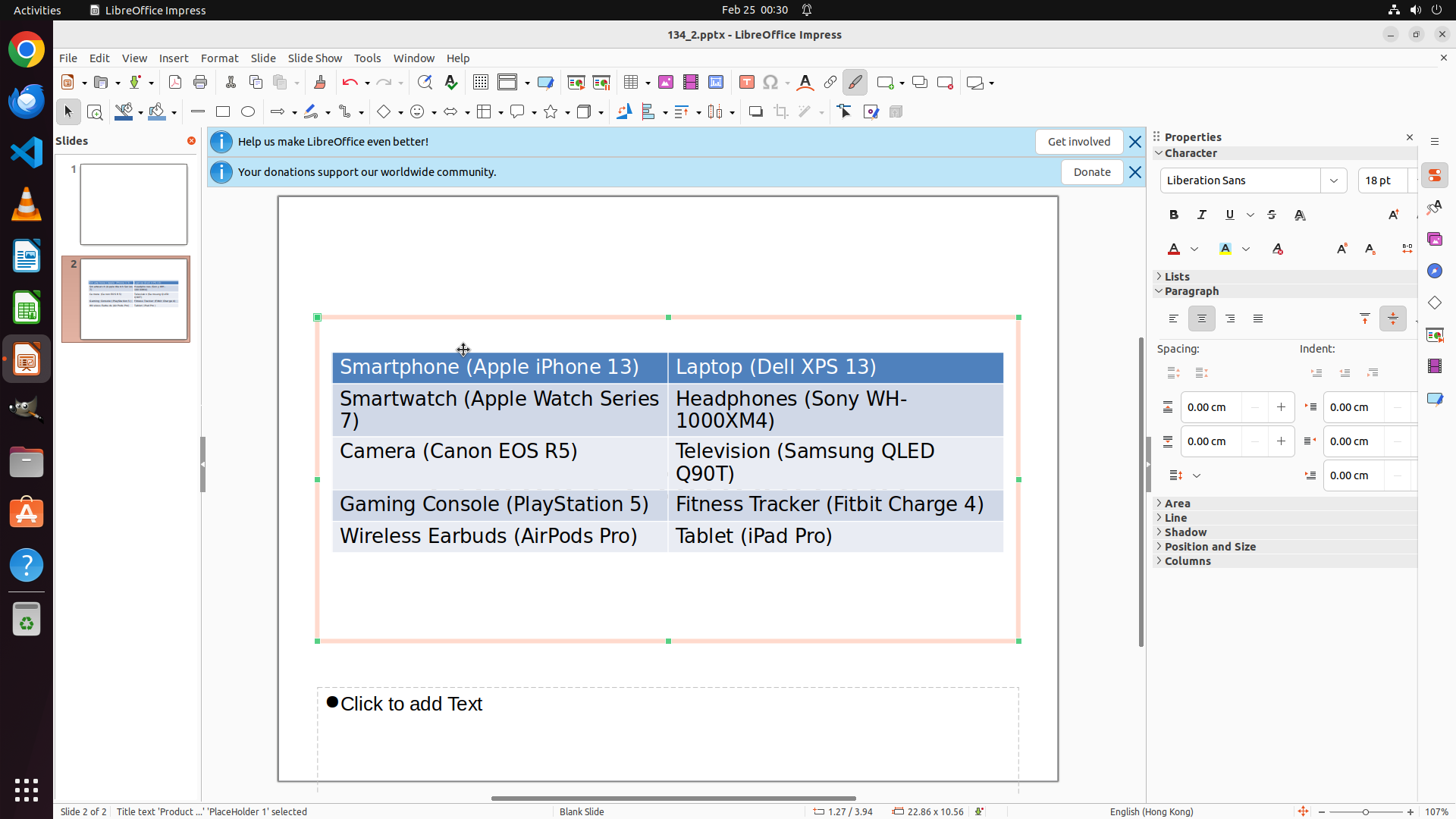
Before step 43
Step 43
Clicked empty slide space trying to deselect before moving title.
Before step 45
Step 45
Still stuck in the same deselection loop; title remains at top.
Before step 47
Step 47
Same ineffective click action repeated without progress.

The baseline falls into a long recovery loop, repeatedly clicking empty slide space without returning to a successful object-move workflow.

After Specialization
After step 16
Step 16
Explicitly exited text-edit mode with Esc after recognizing the incorrect interaction state.
After step 18
Step 18
Dragged the title downward once object handles became visible.
After step 22
Step 22
Final drag places the title at the bottom region of the slide.

The specialized model recovers by leaving text-edit mode and then resumes the correct object-drag sequence until the title reaches the bottom region.

Analysis: The core difference is recovery from an incorrect interaction mode. The baseline remains trapped in a repeated deselection loop. The specialized model recognizes it is in text-edit mode, exits with Esc, and completes the object-level drag needed to reposition the title.
Case Study #4: LibreOffice Impress
"Navigate to slide 5 and set the font color of all textboxes to yellow."
Before Specialization
Before step 7
Step 7
Switched from title to subtitle after partially recoloring the slide.
Before step 9
Step 9
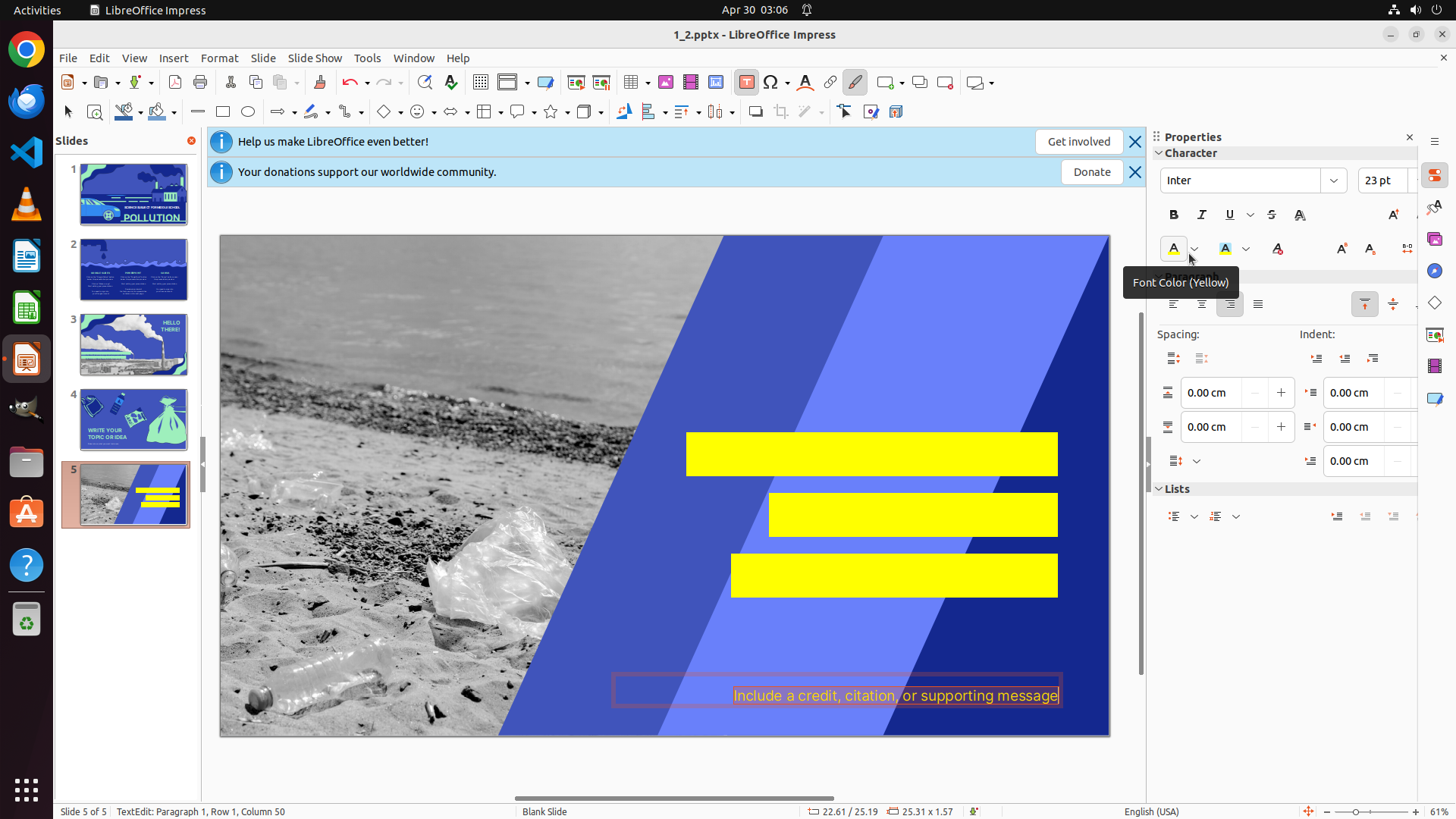
Opened yellow color picker for the subtitle text.
Before step 11
Step 11
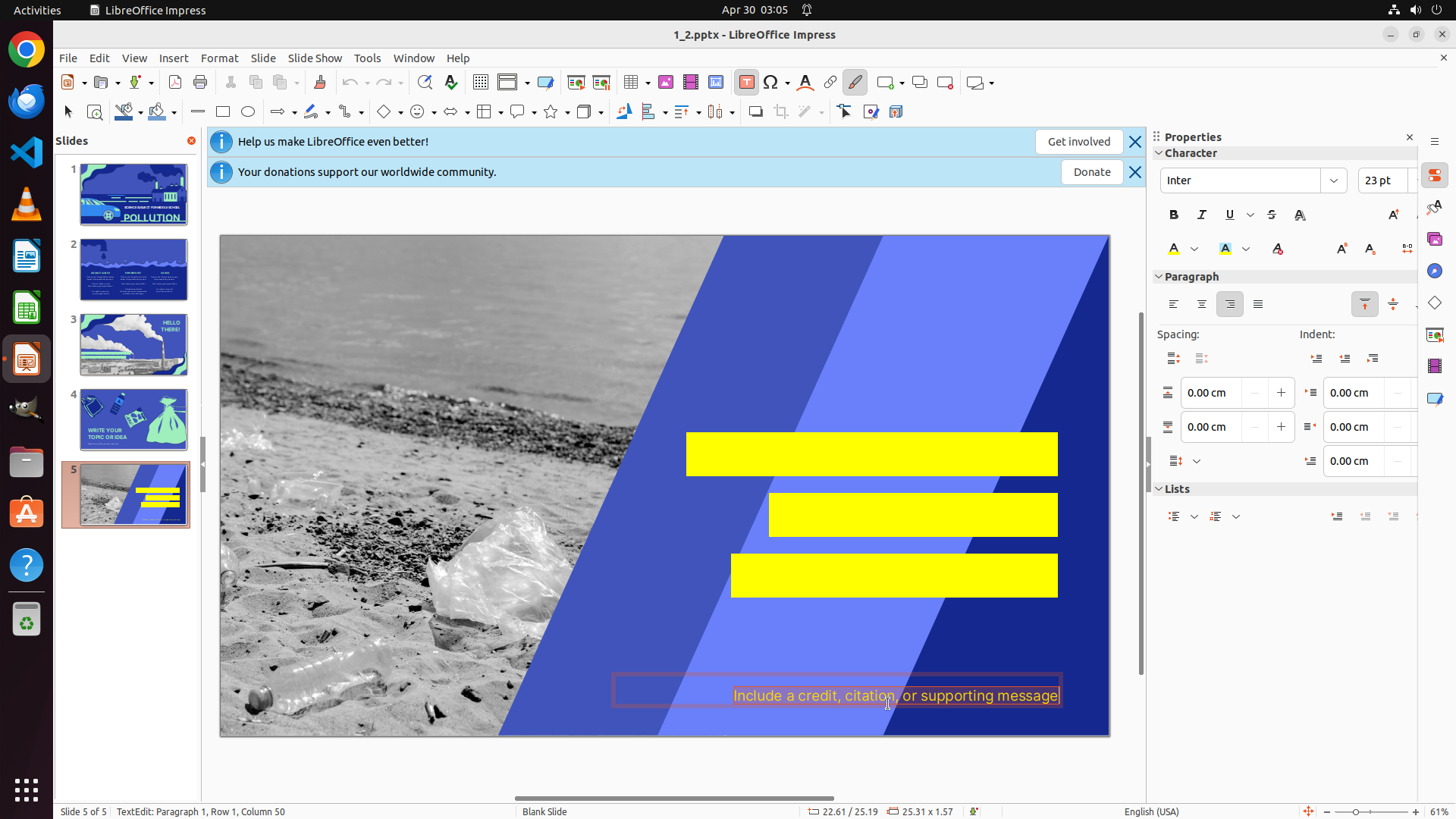
Marked DONE after recoloring only title and subtitle, leaving other text elements unchanged.

The baseline stops after recoloring two obvious textboxes, leaving the broader "all textboxes" requirement only partially satisfied.

After Specialization
After step 26
Step 26
Re-selected the subtitle with Ctrl+A to ensure all text in the box was targeted.
After step 28
Step 28
Applied yellow through the font-color control after returning to the correct formatting context.
After step 31
Step 31
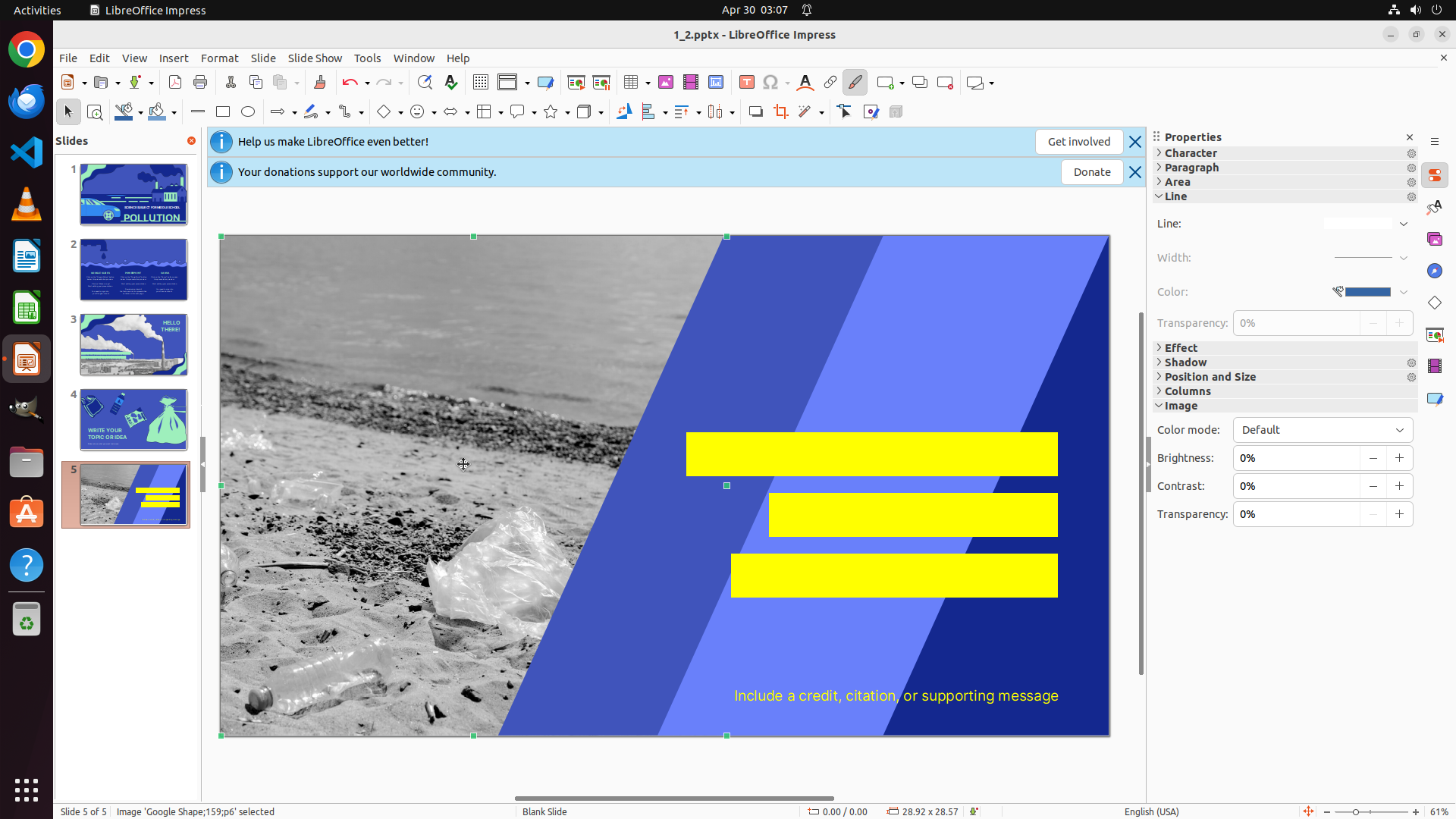
Continued until all text elements on slide 5 were yellow before marking DONE.

The specialized model continues beyond the first successful edits and only finishes once all required text elements on slide 5 are yellow.

Analysis: This example highlights improved task-completion coverage. The baseline performs the obvious recoloring steps and terminates early. The specialized model keeps checking whether the entire slide matches the instruction, re-enters the formatting context when needed, and finishes only after all required textboxes are yellow.

BibTeX

@article{kim2026learnweaknessesautomateddomain,
  title   = {Learn from Weaknesses: Automated Domain Specialization for Small Computer-Use Agents},
  author  = {Kim, Suji and Kim, Kangsan and Hwang, Sung Ju},
  journal = {arXiv preprint arXiv:2605.28775},
  year    = {2026}
}